
I’m going to say something that most people in my field avoid: the majority of people reading this right now have a network that isn’t particularly hard to break into. Not because they’ve done something wrong. Not because they’re not careful people. Just because network security is one of those things everybody assumes got explained somewhere along the way, and mostly it didn’t.
” Network Security: What Is It and Why Does It Matter?
So what actually is it? Network security is everything you do to keep the roads your data travels on safe. It’s the tools, the settings, and the good habits that protect the connections between your phone, laptop, and the internet. Your router and Wi‑Fi are like gates and signs on those roads. If the road isn’t protected, someone with the right tools can listen to your messages, steal information, or sneak into your devices without you knowing.
The numbers in 2026 aren’t reassuring. Ransomware cost businesses globally over $20 billion last year. Most homes now have more than a dozen internet-connected devices — cameras, thermostats, speakers, TVs — and a significant chunk of those were never secured properly out of the box. Attackers know this. They’ve built automated systems that scan for these gaps around the clock.
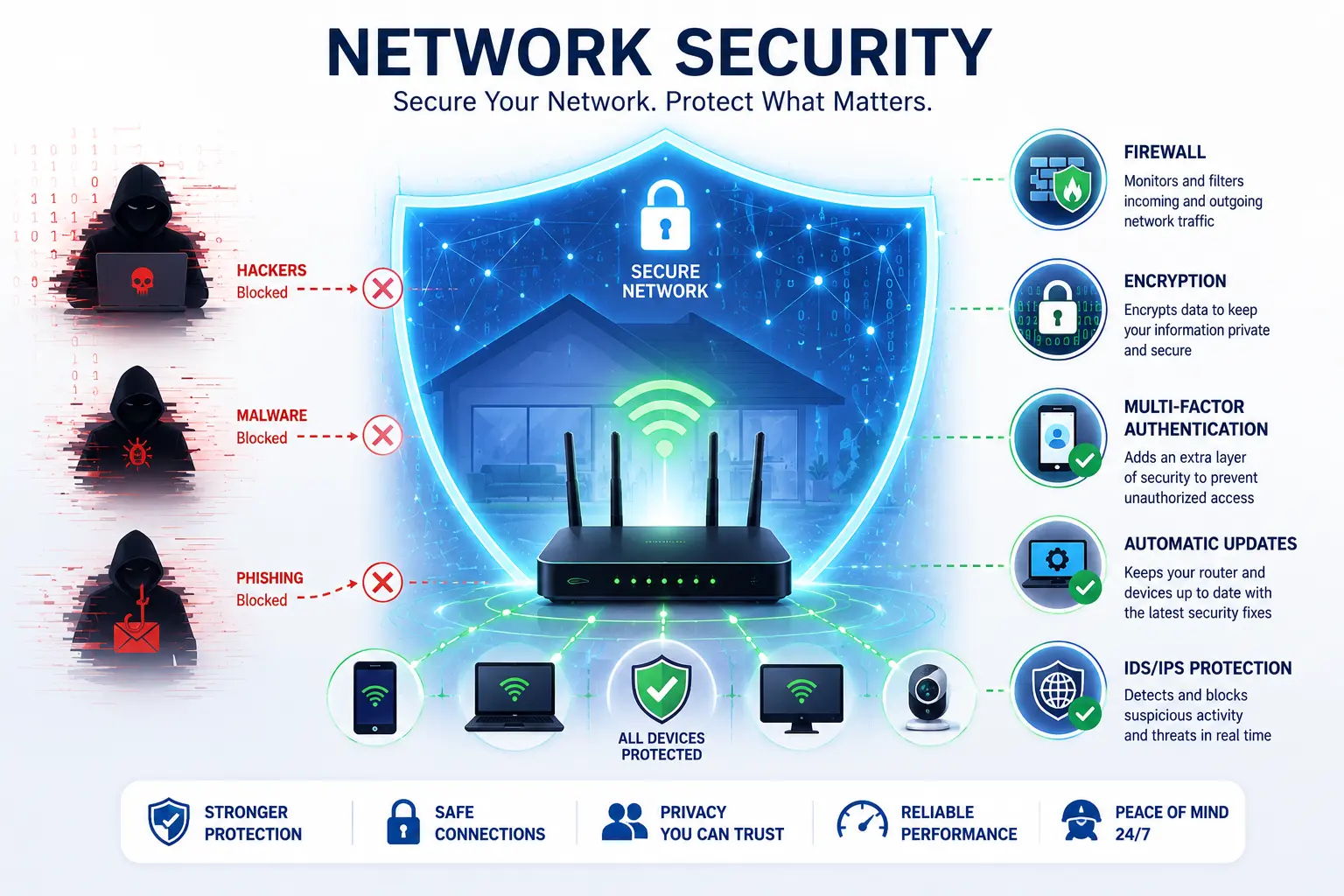
Nothing in this guide requires a technical background. It requires about twenty minutes and the willingness to follow through on a couple of things to know what network security is.
1. Network Security Gap: Your Router Has a Firewall — But Is It Doing Anything?
Your router probably has a firewall built in, yet lots of people assume it’s running — when it isn’t. Imagine a firewall as the gatekeeper at the edge of your network. It checks every connection coming in or going out and follows a ruleset that lets safe traffic pass and stops the dangerous stuff. Traffic that looks legitimate passes. Traffic that doesn’t gets dropped. This happens thousands of times per second and when it’s working right, you never notice it, which is the whole point is nework security actually a thing.
The issue is that manufacturers tend to ship routers optimised for ease of setup rather than security, so the firewall sometimes comes disabled by default. I genuinely don’t know why this is still a thing in 2026 but here we are , not even knowing what basic network security is.
A family-run bakery found this out the expensive way. Their card payment system was sitting directly exposed to the internet, nothing in front of it. A hacker ran a routine scan, found the open connection, and loaded card-skimming software onto their terminal. Customer payment data leaked for three months before anyone noticed. The bank flagged it, not the bakery. A single firewall setting — already available on the router they owned — would have made that connection completely invisible , this is due to lack of basic knowledge on network secuirty .
Check this today: open a browser and go to 192.168.1.1, sign in (the default username and password are usually on a sticker under the router), find the Firewall or Security section, and switch the firewall on if it’s off. If you don’t see the option, Google your router model plus “enable firewall” for a step‑by‑step guide.
2. Network Security & Encryption — Why stolen data usually isn’t useful to thieves
When you use public Wi‑Fi at a café or airport, a person nearby can run simple software to snoop on unprotected traffic and see what you’re doing — unless your data is encrypted. Not fragments of it. Not garbled versions. Actual readable data. Passwords, usernames, what pages you’re loading. The tools that make this possible are free and not hard to use.
Encryption is what turns that intercepted data into useless noise. Hackers pick on these devices because they’re the low-hanging fruit. Crack one, and it becomes a back door into the whole network — from there they quietly poke around looking for anything valuable, basically the network security those whose network security is low.
The version of this you probably already see every day is HTTPS — that padlock in your browser’s address bar. Padlock present means the connection is encrypted. No padlock means the data is travelling in the open.
I was at a security conference a few years back where someone demonstrated this in the hotel bar. Opened a packet analyser on the bar’s Wi-Fi and within fifteen minutes had readable login attempts from other guests in the room. Usernames. Partial passwords. These were professionals attending a security conference, and they had no idea it was happening. The ones using HTTPS showed up in the logs too, just as total noise — nothing there to read, nothing there to use, these are also network security hazards that affects these people .
Most of the web runs on HTTPS these days but not all of it, and the consequences of missing a site that are not real.
Check this today: Before you enter a password, card number, or address on any website, look at the address bar. Padlock and https:// at the start — fine. Nothing there — close the tab and don’t go back until you’re on a secure connection.
3. Network Security , Passwords and MFA — I Know, I Know. Stay With Me.
You’ve heard this before. Strong passwords, don’t reuse them, we get it, it’s actually a part of network security hazard, But the reason this keeps coming up is that most people have heard the advice without really understanding what they’re up against, and that gap matters.
When a website gets breached — which happens constantly, to major companies with huge security budgets — the leaked emails and passwords end up for sale online within hours sometimes. Attackers don’t then sit down and manually try those credentials on other sites. They run automated scripts that test millions of combinations across hundreds of platforms overnight while they sleep. If you’ve used the same password on more than one account and one of those services has ever been breached, there’s a reasonable chance someone has already tried your credentials on your email, your bank, and anything else they can think of. They find out before you do. They mainly focus on the ones with week network security, due their
Strong passwords are long, ideally random, and different for every single account. The only realistic way to do that without going insane is a password manager. Its actually a good network security practise, Bitwarden is free and good. 1Password costs money and is also good. You remember one master password, the app handles everything else, and you stop reusing “fluffy2007” across fourteen accounts.
But even a genuinely strong password has one problem — it can still get stolen. Data breaches, phishing, malware. This is where multi-factor authentication matters so much. After your password, you need a code from your phone. No code, no entry, doesn’t matter what password they have. Microsoft’s numbers on this: MFA blocks over 99% of automated account attacks. That’s not close — that’s decisive. its a good network security hack.
A graphic designer I used to work with had her email password exposed in a breach. Attacker tried it on her invoicing software the same day, totally standard move. MFA pushed a notification to her phone. She denied it, changed her password in the next ten minutes, and that was the entire incident. No lost clients, no tampered invoices, nothing. The MFA setup had taken her maybe ninety seconds when she first enabled it.
Do this before anything else today: Go to your email account settings and turn on two-factor authentication. Call it 2FA, MFA, two-step verification — it’ll be in there somewhere. Two minutes, and it’s the single most impactful change most people haven’t made yet.
4. Network Security & Segmentation — Your Smart Bulbs Don’t Need Access to Your Work Files
This one sounds like enterprise IT jargon and it really isn’t. Segmentation means splitting your network into separate zones that can’t easily reach each other. Your laptop and phone sit on the main network. Your smart TV, security camera, thermostat, Alexa, whatever else — those go on a separate zone. If someone gets access to one zone, they’re stuck in it. They can’t cross over to where your actual data lives.
The reason this matters is that smart home devices are, as a category, pretty rough from a security standpoint. They’re built for cheap and fast setup, updated irregularly, and they often ship with the same default password across thousands of units — sometimes published openly in product documentation. These endpoints are common initial targets because they tend to be poorly hardened. After compromise, attackers pivot from the infected host to other systems to locate sensitive data or critical services.
A law firm I know had known set up their network security mostly on autopilot, their IT consultant had recommended it as routine. When an attacker got access through a networked printer — which is a more common entry point than you’d expect — they were completely stuck. The printer segment had no route to client files or financial records. Those lived somewhere the attacker couldn’t reach. The whole thing cost the firm one device and one afternoon. Without that network security and segmentation, they’d likely have been looking at a full breach of years of client data.
Set this up today: Log into your router and look for guest network settings. Create a separate Wi-Fi, then move every smart home device onto it. Cameras, speakers, TVs, thermostats — all of it. Computers and phones stay on the main network. Most modern routers support this and it takes about ten minutes.
5. Intrusion Detection — Network Security That Catches What Slips Through
Look, you can set everything up perfectly and something will still occasionally get through. A user has a bad day and clicks something. A vendor releases an update with an unknown vulnerability in it. Zero-day exploits exist specifically because no defence is complete.
Intrusion Detection and Response — IDR — is the layer of network security that catches problems after they’ve already got in. It watches traffic patterns on your network looking for things that don’t belong. A device suddenly communicating with a server it’s never contacted before. Large amounts of data leaving the network at 3am. Repeated failed login attempts from unusual locations. When something looks off, it alerts you — sometimes it can isolate the problem before you’ve even responded.
Speed is why this matters. Catching a breach in network security in an hour versus letting it fester for six weeks is night and day — the longer it goes unnoticed, the more damage attackers can do.. Most organisations that suffer serious long-term breaches had the indicators sitting in their logs the whole time — they just had nothing looking at them.
A mid-sized insurance company had their IDR flag unusual outbound traffic at 2:30 in the morning — one laptop, connecting repeatedly to an IP address it had never touched before. This network security caught the information threat early itself, IT were notified, the laptop was taken off the network before dawn, and they confirmed spyware. Client data was intact. Without that monitoring running in the background, they’d almost certainly have gone weeks before discovering it through something much more visible and damaging.
Start here today: Enable login notifications on your email and banking accounts as a part of your network security habits . Most platforms will send you an alert when a login comes from a new device or location. It’s a consumer-level version of the same principle and it’s free on every major platform.
6. Network Security Updates — The Fix Has Been Sitting There This Whole Time
Of everything in this list, this is the one that frustrates me most to write about. Because it’s so avoidable.
Here’s what happens when a vulnerability gets discovered and a patch gets released. The people who update are protected on network security. And for the people who don’t — that vulnerability is now publicly documented, with a known method of exploitation, on a system with no protection.
Think of a patch as the repair manual for software — it tells you exactly what’s wrong and where to fix it. When systems missed those fixes in May 2017, WannaCry spread to more than 200,000 machines in 150 countries and left many NHS hospitals in England unable to access patient records.. The vulnerability it exploited had been patched by Microsoft in March — two months earlier. Every machine WannaCry infected had been offered the fix. They just hadn’t taken it.
Someone I dealt with a few years ago ran a router on outdated firmware for close to a year. The specific vulnerability in that firmware version was listed in public security databases with detailed documentation. An attacker found it, used it to redirect his family’s internet traffic through a server they controlled, and spent weeks pulling credentials from unencrypted sessions. His bank. His email. His daughter’s school login. He found out when his bank called about unusual access from another country. One update, at any point in that year, and it doesn’t happen.
Routers are the specific thing most people never update. Laptops and phones nag you. Routers just sit there quietly on whatever firmware they shipped with, sometimes for years.
Check this today: Go to your router manufacturer’s website, find your model number, and look for firmware updates. If there’s one available, install it. If you’ve never done this, there’s a reasonable chance it’s been years.
7. Network Security & Habits — The Thing Every Technical Layer Depends On
More than 90% of successful cyberattacks begin with a person doing something they shouldn’t have. These aren’t reckless people — they’re normal, switched‑on folks who were busy, tired, or just caught off guard by a convincing message. Today’s phishing emails aren’t the badly spelled “Nigerian prince” scams from years ago.
They’re personalised, correctly formatted, contextually aware. Some of them reference your actual name, your employer, a recent transaction. AI has made this dramatically easier for attackers to produce at scale, and the visual tells that used to give them away are mostly gone.
Even the best firewall won’t help if you paste your password into a fake site. And encryption won’t save you if you’re tricked into giving your login away. In the end, people are either the strongest link in security or the weakest — and that mostly depends on a few small habits.
Hover over links before clicking. The actual destination address shows up at the bottom of your browser window, and it often gives away the scam immediately — a URL that looks like it’s going to your bank but is actually heading somewhere in a different country entirely.
Treat urgency as a warning sign. Real banks and real companies don’t send emails telling you to act in the next twenty minutes or lose access to your account. That manufactured pressure exists specifically to stop you thinking. When you feel rushed, slow down.
Don’t plug in USB drives you didn’t buy yourself. A penetration tester I know dropped unmarked USB drives in a company’s car park as part of an authorised security test. Within an hour, 60% of them had been plugged into work machines by curious employees. The drives were loaded with tracking software for the test. In a real attack, it would have been malware.
A nonprofit organisation I worked with ran a phishing simulation on their whole staff before doing any training — just to get a baseline. 62% clicked the test link. After two hours of focused training, they ran it again. 8% clicked. Same people, same inboxes. The only variable was knowing what to look for.
Try this right now: Find an email in your inbox with a hyperlink in it.Hover your mouse over the link without clicking. Look at the small box that appears at the bottom of your browser window — that shows the real web address. Does it match who supposedly sent it? If not — there’s your example.
– Why You Can’t Just Pick One of These and Call It Done
People ask me this fairly often. Which one matters most? What’s the single thing they should focus on? I understand why — it’s a reasonable way to try to make this manageable. But there genuinely isn’t one answer.
A firewall without MFA is like leaving your front door wide open for anyone with a stolen password. MFA won’t fully protect you if your router’s firmware is outdated—attackers can still exploit known holes.Even with regular updates, a network that isn’t segmented can let one hacked smart device drag the rest of the network down. Every security measure blocks different threats, but each one also has weaknesses. That’s why they work best together.
Security pros call this “defense in depth”—assume one layer might fail, so there’s always another behind it. Attackers go for the easiest door. A network with several layers won’t be unbreakable, but it makes the job slow and annoying. Most attackers just walk away when it stops being easy
– What’s Getting Harder to Defend Against in 2026
Phishing that looks completely legitimate
AI-generated phishing emails are now good enough that visual inspection often won’t catch them. Correct grammar, right logos, personalised details. The defence has to be procedural rather than visual: any unexpected message involving money, login details, or urgency gets verified through a completely separate channel. Not by replying to the email. By calling the person directly.
Attacks arriving inside software updates
These attacks trick you by compromising a company you already trust. They sneak malware into a real software update that installs on its own. That’s why they’re hard to spot—they’re banking on trust, not a bug.
They’re harder to catch because they ride on trust, not on a security flaw. Stick to actively maintained software from known sources, pay attention to security bulletins from the tools you use, and make sure unusual behaviour would get flagged even from applications you’ve whitelisted.
Smart home devices as network entry points
IOT devices continue to ship with poor default security — same credentials across entire product lines, minimal update cycles, little monitoring. Attackers target them at scale because they’re easy to find and easy to compromise. Change default passwords on every device the day you set it up. Enable auto-updates. Keep them segmented away from your main network.
Ransomware can move faster than you can respond. Modern automated strains can encrypt your whole network in under ten minutes. Offline backups kept separate from your main network give you a recovery option without paying. Actually try restoring from them. If you’ve never done a test restore, you don’t really know if the backup works.
– Eight Things Worth Doing This Week
- Log into your router and confirm the firewall is on
- Check your router manufacturer’s site for a firmware update
- Enable MFA on email and banking accounts
- Create a guest Wi-Fi network and move smart devices onto it
- Check for padlock and https:// before entering anything sensitive online
- Change default passwords on your router and every smart device
- Back up important files somewhere not connected to your main network
- Turn on login notifications for your most important accounts
Three Times This Actually Made a Difference, The link she almost clicked , Sarah lives in Georgia, stay-at-home mum, not particularly technical. An email landed in her inbox that looked exactly like her bank — logo, her full name, correct colours, professional layout. There was supposed to be a problem with her account, urgent, click this link. Before she clicked, she hovered. The URL that appeared had nothing to do with her bank. She called the bank directly. Confirmed phishing. Deleted the email. Two extra seconds is all that separated her from handing over her account credentials.
The firm that got lucky on purpose
Twelve-person accounting firm, set up network segmentation and intrusion detection a few months earlier on a consultant’s recommendation. Ransomware came in through a malicious email attachment on one employee’s laptop. IDR flagged it within minutes, the machine got isolated, and the ransomware hit a wall trying to spread — client files sat in a separate segment it couldn’t reach. Cost them one laptop and one afternoon to sort out. Without that setup, they were looking at a full breach of years of financial records and probably the end of the firm.
The student whose data nobody could read –
Marcus was finishing his final year, did everything on campus library Wi-Fi — banking, coursework, personal email. He had two standing rules: HTTPS only, and always through the university VPN. One afternoon a few tables away, a student was running a packet capture tool for a security class, legitimately recording traffic on the network. He could pull readable data from dozens of devices. Marcus’s traffic was there in the logs, just completely unreadable — encrypted and tunnelled. The other student moved on.
Cybersecurity is the full toolbox for digital safety. Network security is the part that guards the connections — your router, Wi‑Fi, and device communication rules.Network security is the part that protects the connections — your router, Wi‑Fi, and the rules that let devices talk to each other. Since most attacks travel across a network, this layer gets a lot of focus.
Network security is one piece of that, focused on the pathways where data moves — your router, Wi‑Fi, and the rules that guide communication. Because most attacks go through a network at some point, this piece gets special focus.
Am I ever completely safe?
No, and I’d be doing you a disservice pretending otherwise. Even well-resourced government systems get breached. The realistic goal is to be a tough enough target that most attackers give up and move on — and to have a clear recovery plan ready for when something slips through.The two things matter about equally.
How often do I actually need to update things?
As soon as updates are available, which is why automatic updates are worth enabling wherever you can. Routers are the exception — they almost never update themselves, so check manually every month or two. It’s boring and easy to forget and it matters more than most people realise.
You think a VPN covers all of this?
No. A VPN helps- does it, do you believe it completely, it scrambles traffic and hides your IP — but it’s not everything you need. Relying on it alone is like locking the door and leaving windows open.
Do I need this at home? Yes. Devices are always online. A firewall, MFA, encryption, updates, and good habits together make you much harder to hack.
You don’t need enterprise hardware. But the fundamentals — firewall on, MFA enabled, router updated, smart devices on a separate network — cost nothing and block the vast majority of attacks that target home users. The attacks targeting your home network aren’t sophisticated. They’re automated, they’re looking for easy targets, and the basics genuinely work against them.
Conclusion
You actually dont need to a well knowledged techy to be safe. Network security isn’t part of being the best or being perfect in everything its being not the kind that the attackers dont target. Most of the attackers are already automated or looking for easy target for easy wins.
Just Turn on MFA on youe e-mail. Regularly check your router’s firmware and always update it and also move your smart devices into guest mode, do these regualarly and you’re safe, youre already ahead of most people out there.
Before You Close This Tab
If you had made this past your more your already past so many people. Here’s the real thing: we’ve all read security tips, nodded along, and then never actually changed anything. you can check out more about 10 Essential Data Privacy Protection Strategies to Shield Your Info from Hackers and Trackers
just click on the link
Pick two things. MFA on your email and a firmware check on your router. Do those today while it’s still in your head. The rest of the list will still be here tomorrow.
And also there are some important topics on how goe and aeo works if you want you can click the link to visit my blog too.
That’s all.